

Most storage teams know exactly which data should live where. Fresh results belong on fast disk, finished projects on cheaper capacity, and data that must be kept for years on tape or object storage. The hard part is making that happen every day without scripts or tickets. In NODEUM, that job belongs to the data placement policy: a rule set on a container that decides which data lives on which secondary pool, and when it moves. This article explains the three building blocks, containers, secondary pools and placement policies, and how they fit together in NODEUM Data Archiving.
What is a container in NODEUM?
A container is a virtual file system. Users and applications see it as one place to read and write files, through NFS, SMB or S3. Behind that single view, the files can be stored on several different storage systems.
The container is also where you set the rules. Every placement policy is attached to a container, so a container is both the namespace users work in and the unit you manage. A common pattern is one container per project, department or instrument, so that each group of data can follow its own rules.
What are secondary pools?
The storages behind a container are called secondary pools. In NODEUM Data Archiving they are of type active archive: storage that keeps data online and recallable, rather than locked away in a backup format. A secondary pool groups storage of one kind: NFS or SMB storage, S3-compatible object storage, or a tape library.
Because pools are defined once and then referenced by policies, you can add capacity or replace a storage system by changing the pool, without asking users to change the paths they use.
What a data placement policy does
A data placement policy answers two questions for each file in a container: on which secondary pool should it live, and from when. In practice a policy combines three things:
- Selection: which files the rule applies to: the whole container or a selection of folders and files, refined by path, file name, age and size.
- Target: the secondary pool, or pools, the selected files should be placed on. Writing to two pools gives you two copies, for example one on tape and one on object storage.
- Timing: when the policy runs: automatically (for example every 5 minutes), periodically on a schedule, or manually on demand.
The policy then does the work that used to sit in scripts: it finds the matching files, copies them to the target pool, verifies them and records what moved. Every movement is logged, so you can show which file went where, and when.
A simple worked example
Take an imaging facility that writes raw data to a project share every day. The team wants recent data on fast storage, completed data on two independent copies, and nothing to change for researchers.
- Create a container for the facility, for example
/imaging, exposed to researchers as their usual share. - Define a secondary pool of type active archive, here a pool on the tape library that writes LTFS cartridges.
- Create the archiving task: the whole
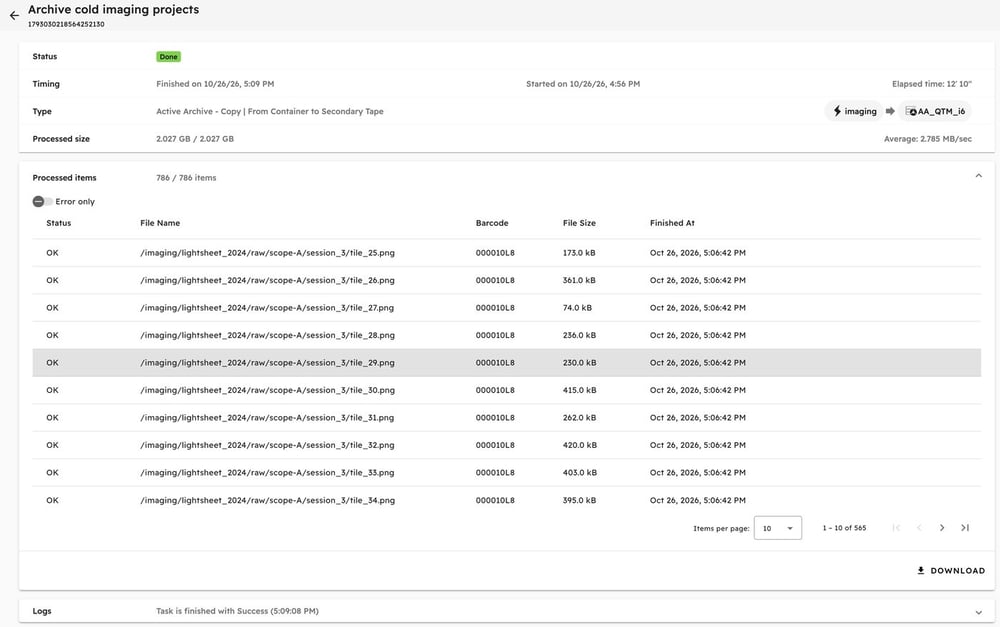
/imagingcontainer as source, the tape pool as destination, and one filter: files not modified for 180 days. In our demo, that selected the three older projects (786 files, 2.027 GB) and left the current one where it was. - Choose copy or move: the Active Archive – Copy action used here keeps the originals on primary storage and adds a verified copy on tape. With a move, the file is removed from primary storage after verification, or replaced by a small text file that keeps its name and records the rule that moved it and where the archived data now sits.

- Review the result in the task view: each file, the tape it was written to (by barcode) and its status. In our demo run, all 786 files (2.027 GB) from the three cold projects were copied to LTFS tape 000010L8, each with status OK; the 2026 project was left in place.
 Researchers keep working in
 /imaging. The facility gains capacity on fast storage, and the data now exists on two different media.
One namespace, many pools: what users see
The point of the container is that placement is invisible to users. A file placed on tape still appears in the same folder, with the same name. Users do not need to know which pool holds it, or how many copies exist.
When someone opens a file that is no longer on primary storage, NODEUM recalls it from a secondary pool. Recall from object storage or disk is fast; recall from tape takes longer, because the cartridge has to be loaded and read. Either way, there is nothing to request: the user clicks the file and NODEUM retrieves it automatically. For large recalls, it pays to request a whole dataset at once rather than file by file, so tapes are read in order.
This is what separates an active archive from a backup. Backup copies are for recovery after something breaks. Data on an active archive stays part of the file system: findable, readable and governed by the same rules.
Good practices for data placement policies
- Start from retention rules, not from storage. Write down how long each kind of data must be kept, and how quickly it must be readable. The policy follows from that.
- Keep policies few and readable. A handful of clear rules per container is easier to audit than dozens of exceptions.
- Use two pools for data you cannot recreate. Two copies on different media, ideally tape and object storage, protect against the failure of one system.
- Match containers to how people work. One container per project or instrument makes ownership and reporting simple.
- Test recall before you need it. Recall a sample dataset from each pool, and time it, so expectations are set before a deadline.
- Review the movement history regularly. It shows whether policies place what you expect, and gives auditors the evidence they ask for.
Where this fits
Containers, secondary pools and placement policies are the core of NODEUM Data Archiving. They also work with NODEUM Data Mover when data has to move between parallel file systems, object storage and cloud before it is archived. If you are designing your first policies, start with the data you are required to keep and the storage you already own.
Next step: download our active archive white paper, or talk to a NODEUM expert to map your data, pools and placement policies.